What Merenyo does so you don't have to.
You write the task down. Merenyo handles the rest — where it goes, what's next, what to do when the day falls apart. Here's all of it, plainly.
Every task gets a real time, and tells you what it is.
Name your time blocks once — "9 to 12, Deep Work," "evenings." After that, every task you add is placed inside one of them, in the first open slot.
- It shows you where it landed. The moment you save a task, a banner tells you the day and time. Open it later and change anything — the time updates as you go.
- No blocks? No problem. If you'd rather not set up your week, tasks still get scheduled. You can add blocks whenever they'd help.
- It plans around your meetings. Connect Google Calendar and Merenyo schedules around your events, and shows them alongside your tasks. Read-only — it never changes your calendar. Web app for now.
- Nothing is dropped. No deadline just means a lower priority, not a missing slot. If something truly can't fit, it says so.
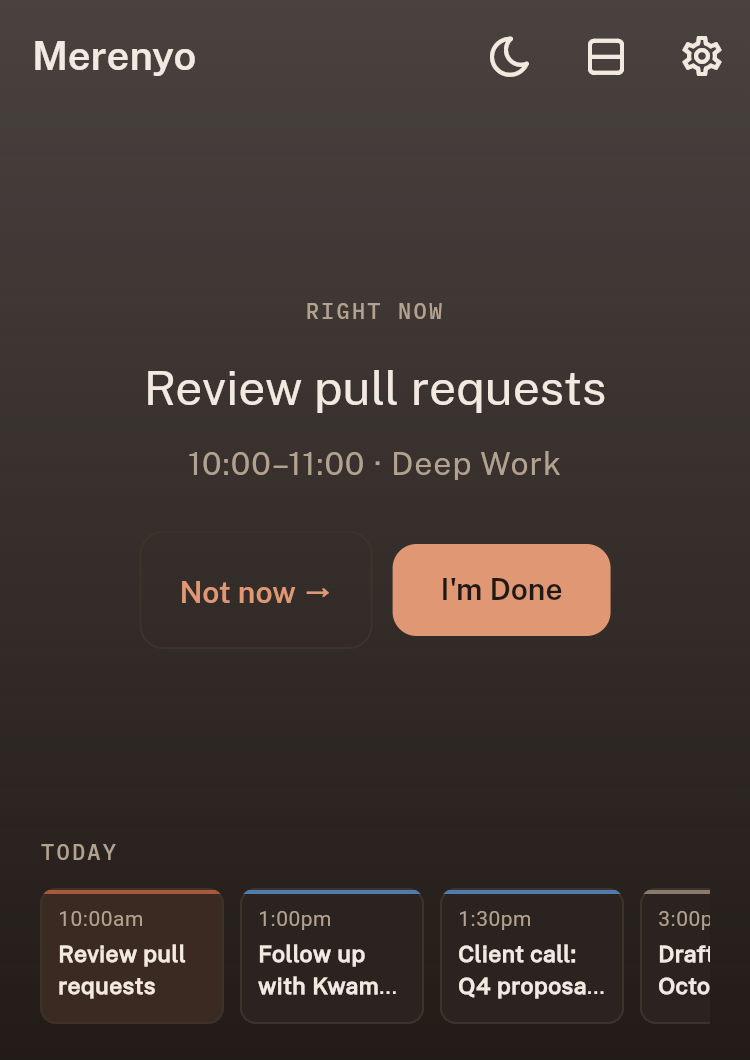
Open it and there's one thing on screen.
The top of your day is the task you should be doing right now — big, with two buttons. Not a list to scan, not a calendar to read.
- Done, or not now. Two taps cover almost everything. Finish it and the next task steps up on its own.
- The rest of today, at a glance. A strip under it shows what's coming and when, so nothing sneaks up on you.
- Light and dark. It follows your device, or you can pick.
You can overrule the plan without breaking it.
Schedules that can't bend get abandoned. Merenyo bends — and re-plans everything around your change in one go.
- Not now. Hold a task for later today, tomorrow or next week, or swap it with what's next.
- Make this Right Now. Something just landed and it can't wait? Long press the task and choose Do now. It takes the slot.
- Do next. Long press a task and choose Do next to queue it ahead of everything else, without kicking out what you're doing.
- A heads-up before it's late. Tasks nearing their deadline get a warning, and anything past due waits for you under Needs attention.
A name is all it needs.
Type it, hit enter, done. Everything else is optional and stays out of the way until you want it.
- Add detail only when it matters. A deadline, a priority, how long it'll take, or "not before" a certain day — each one is a tap away, never a required field.
- New tasks default to an hour. Change it with the duration wheel if it's shorter or longer.
- Works offline. Add tasks on a train; they sync when you reconnect.
On the web today. Android is on its way.
Your tasks and schedule live in your account, so they follow you from one device to the next.
- Reminders that find you. Get notified when a task is about to start or is running late.
- A real free plan. Not a trial. See pricing for what Plus adds.
What isn't here yet.
We'd rather tell you now than have you find out after signing up.
Android first, then iPhone. The web app works on iOS in the meantime.
Write the first one down.
There's a genuinely usable free plan — not a trial. No calendar to set up first, no tutorial to sit through, just a name and a moment you don't have to think about again.
Open Merenyo →